LUKETURE Clamp-On Desk Side Organizer: No Drilling, No Clutter
We tested the LUKETURE clamp-on desk side organizer. Steel build, magnetic pen holder, no drilling required. Here's the real verdict.

Reviewed by
Seb and Michelle
We've tested over 6,500 products in the last 5 years – collaborating with over 4,000 brands and bringing our style of reviews to multiple platforms. More about me →
This post contains affiliate links. I may earn a commission at no extra cost to you.
Quick Verdict
The LUKETURE clamp-on desk side organizer is a genuinely useful add-on for anyone who’s tired of desktop clutter. Steel build, magnetic pen holder, holds up to 22 lbs, and the whole install takes about 30 seconds of screwing. The catch: it only works on flat-edge desks up to 2.8 inches thick, so check your desk first.
Buy if you:
- Want to move your laptop off the desk surface without losing access to it
- Need a clutter-free desktop and hate having knick-knacks in the way
- Have a flat-edge desk under 2.8 inches thick
- Want a stylish, no-drill solution that looks clean in a home office
Skip if you:
- Installed it in the front and then realized you need to remount it on the side for actual use — plan your placement before clamping down
- Have a curved-edge or special-shaped desk; the clamp won’t seat properly
- Need a desk edge thicker than 2.8 inches or thinner than 0.3 inches
Clicking takes you to the seller's website. We may earn a small commission if you purchase, at no extra cost to you.
Clamp-On Desk Side Organizer Keeps Laptop Within Reach
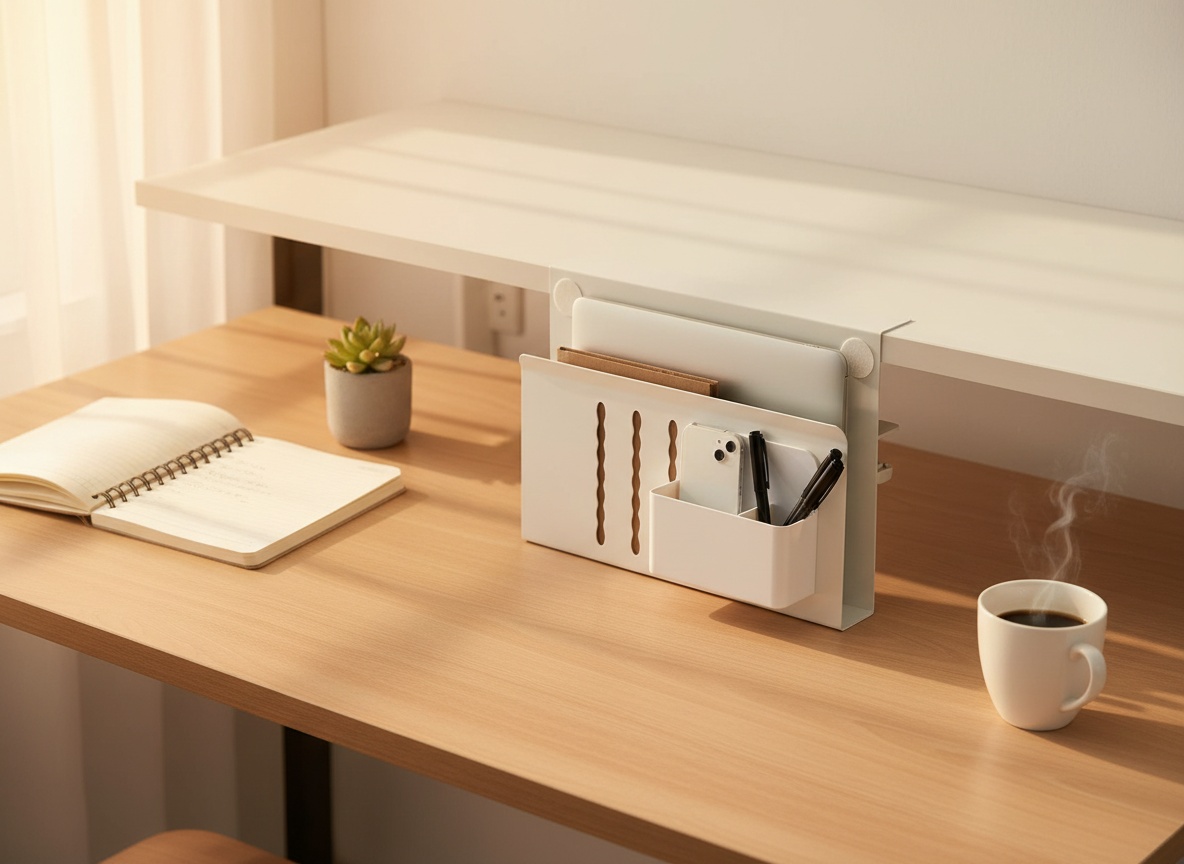
Check this little add-on you can attach to pretty much any type of desk. That’s how I opened the review, and I meant it. I had the LUKETURE desk side organizer mounted at the front of my desk with my laptop slid right in. It worked fine as a demo. But within a couple of minutes of showing it off, I was already saying I’d move it to the side for real work. Right? That’s the whole idea. You want it where your hands can reach it without the thing being in the way of whatever else is on your desk.
That’s what this organizer is solving. Not a complicated problem, but one that drives me crazy. Clutter. Specifically, the kind of low-grade desktop chaos where your laptop is taking up half your workspace, your pens are rolling around, your phone is somewhere in the pile. I just don’t like clutter. And a clamp-on steel organizer that holds everything off the desk surface while keeping it all at the ready? That’s a concept I can get behind.
So here’s the breakdown of what this thing is, how the install actually goes, what I showed during the review, and what you need to know before you check the current price on Amazon.
Steel Build, Magnetic Details, Three Compartments
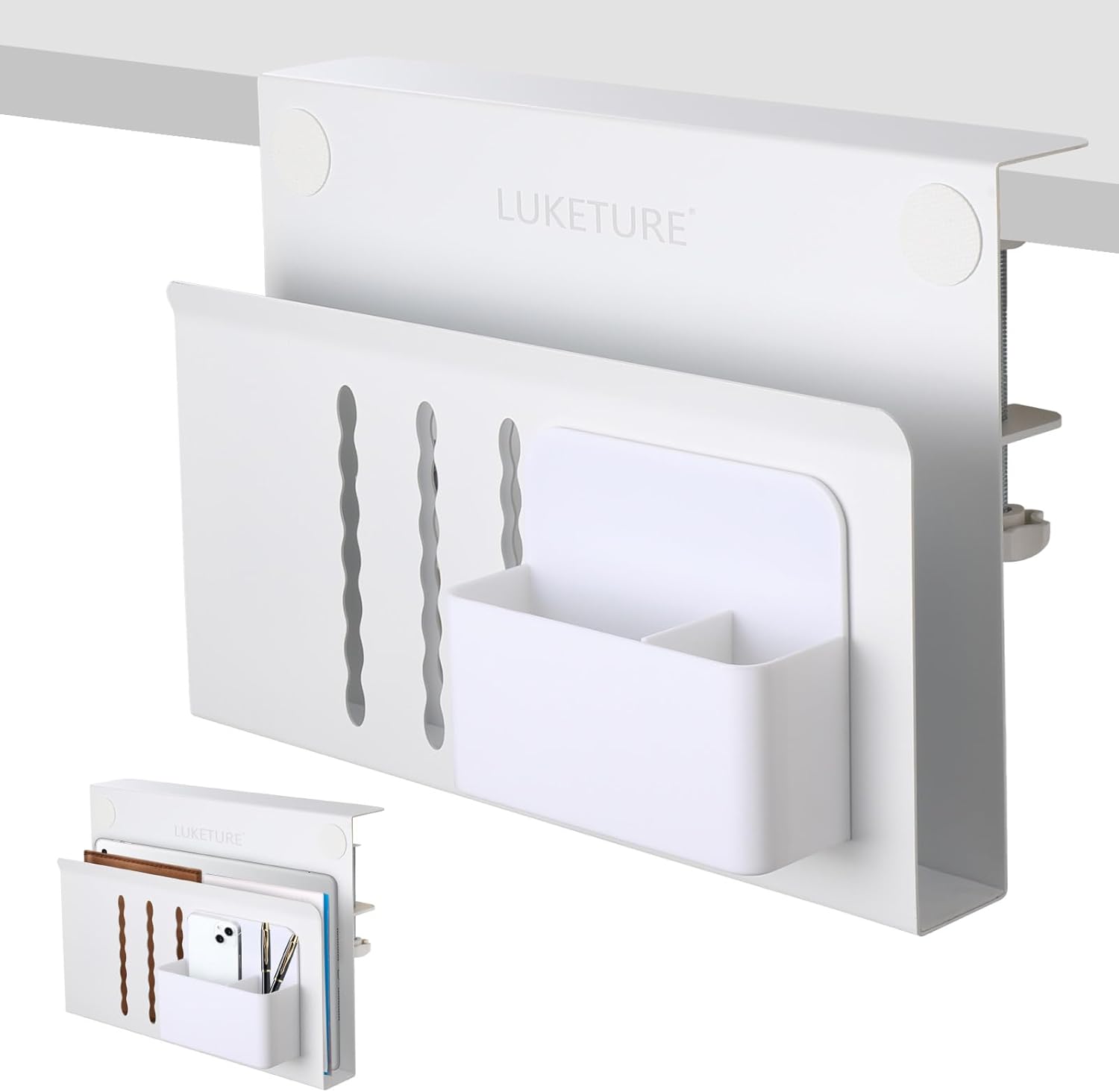
The organizer is steel with a powder coat finish. White. It looks really stylish, which matters when it’s sitting visible on the side of your desk all day. This isn’t a plastic desk caddy. You can feel the difference when you pick it up — it weighs 1.3 kg, which gives you some confidence it’s not going to flex or wobble once clamped down.
The whole unit is 11.8 inches wide, 7.8 inches tall, and 3.5 inches deep. Three compartments total. The main one is sized to hold a laptop, and I had mine slid in there during the review with no problem. There’s padding inside so the metal doesn’t make direct contact with your device. That detail matters — I pointed it out specifically because it’s one of those things that separates a product that was actually thought through from one that wasn’t.
Then there’s the magnetic attachment piece. It’s a smaller secondary holder — also magnetized — that you can stick onto the side of the main unit. I showed this in the review, snapping it on and off. It holds a phone, some pens, or whatever little knick-knacks you’d otherwise have rattling around on your desk. Pretty cool that it’s magnetic so you can reposition it or pull it off without any fuss.
The clamp itself is rated for flat-edge desk surfaces anywhere from 0.3 to 2.8 inches thick. The unit can hold up to 22 lbs. And it needs to embed at least 1.9 inches into the desk edge to grip properly. Those are real specs worth knowing before you buy. Check your desk thickness first.
Clamping On in Under a Minute
The install is legitimately fast. I literally unscrewed it and walked through the whole process during the review to show how it works. You open the clamp, slide it over the desk edge, and screw it back down. That’s it. No drilling, no wall anchors, no tools beyond your hand turning a knob.
I said it during the review and I’ll say it here: if your desk is under about 2.5 inches thick — which most desks are — you’ll fit this with zero problem. The inner clamp surfaces have a non-slip sheet so there’s no scratch risk on the desk edge and the grip stays solid once tightened. You don’t need to go looking for installation hardware. Everything’s built into the unit.
The whole “no drilling required” angle isn’t just a marketing line here. It’s the point. Renters, anyone with a nice desk they don’t want to put holes in, people who like to rearrange their setup — this clamp-on approach makes the organizer portable and reversible. Mount it, use it, move it to a different desk if you want. Super easy.
There are two size configurations available: an M option with one tier and an L option with two tiers. What I showed in the review is the M, the single-tier version. The L gives you an extra level of storage if your desk needs more vertical space to work with.
The Flat-Edge Requirement
Here’s the thing I want to flag before you go any further. The clamp on this organizer is designed for flat-edge tables only. Curved edges, rounded profiles, or any kind of special-shaped desk edge — the clamp won’t seat flush and the unit won’t grip the way it’s supposed to.
And there’s a secondary gotcha: I mounted mine at the front of the desk first, which is where it is in the review. Works fine as a demo. But when I stepped back and thought about it for real use, I said I’d move it to the side. Those are two different mounting positions, and once the clamp is tightened down on a desk, you’re committing to a spot. If you clamp it in the wrong place first, you have to fully loosen, reposition, and retighten. Not a huge deal, but it’s the kind of thing where five seconds of planning saves you a minute of fiddling. Think about where you’d reach it most naturally while working before you lock it in. Front, left side, right side — they’re all different experiences at a real desk.
So no, it’s not a deal-breaker. But it’s worth knowing going in: check that your desk has a flat edge, and decide your placement before you clamp it down rather than after.
Learn more
LUKETURE Desk Side Organizer
Get the best price today →This post contains affiliate links. I may earn a commission at no extra cost to you.

Three Setups Where This Makes Sense
Remote workers with small desks. That’s the most obvious fit. If your desk is under 48 inches wide and you’re trying to run a laptop, a monitor, a mouse, a notepad, and your coffee cup all on the same surface, this organizer pulls the laptop off the desktop entirely and parks it at the edge where it’s still at the ready but not occupying valuable real estate.
Students in dorms or small apartments. Same logic. You don’t have a lot of desk space to begin with, and you need it for whatever you’re working on. Getting the laptop to the side and keeping pens and accessories on the magnetic holder means your workspace is cleaner by default. This is the start of a clutterless life around the desk, and for students who tend to let desk chaos accumulate, having a designated spot for things helps.
People who switch between tasks constantly. If you’re going back and forth between a laptop and physical paperwork or drawing or reading, you don’t want to be sliding your laptop around the desk every time you need the space. Mount this organizer on the side, slide the laptop in when you need to clear your workspace, pull it back out when you need it. The 22 lb weight capacity means you’re not babying a fragile holder — you can grab and go without worrying.
And the magnetic add-on piece extends the usefulness past just the laptop. Pens, a phone, a USB cable, smaller items you want off the desk but within reach. You can organize and rearrange as your setup evolves. That’s a detail that makes this more than a one-trick clamp.
Does the Clamp Justify Dropping the Drill?
The obvious alternative to a clamp-on organizer is anything that mounts with screws or adhesive. Drilled-in solutions are typically more permanent and can go on walls or undersides of desks, but they’re not for renters, they’re not reversible, and they don’t travel with your desk if you rearrange your space.
Adhesive-mount organizers exist too — usually lighter plastic units. They work until they don’t. The adhesive fails over time, especially in humidity, and they can’t hold anywhere near 22 lbs. Not the same category as a steel clamp-on with a grip rated for real weight.
The clamp-on design here wins on flexibility. You’re not committing to a hole in your desk or a sticky pad that might take finish off the surface when it eventually comes down. And because the LUKETURE unit is steel, you’re not giving up durability in exchange for that flexibility. The trade-off compared to a drilled solution is the flat-edge requirement — drilled options can go anywhere there’s a surface. But for most standard desks, the clamp works and the no-drill approach is the better call.
Getting the Placement Right
First thing: grab a measuring tape and check your desk edge thickness before the organizer arrives. It needs to be between 0.3 and 2.8 inches, flat-edged, and the clamp needs at least 1.9 inches of desk depth to embed properly. If your desk is a standard office or student desk, you’re almost certainly fine. But know for sure before you get to install day.
Second: decide left side, right side, or front before you clamp. I had mine at the front for the demo, but the side is where it makes more sense for day-to-day use — you’re not reaching over the organizer to get to your desk, and the laptop is right there off to the side at the ready. Think about which hand you use for your mouse and mount the organizer on the opposite side so neither gets in the other’s way.
Third: use the magnetic add-on piece. It’s easy to overlook, but it’s what makes this more than a laptop holder. Snap it on, load it with pens or your phone, and you’ve removed a whole category of clutter from your desktop surface in one move. That’s the whole idea.
The M and L size options are worth thinking about too. If you have vertical space to work with and want a second tier for documents or notebooks, go L. If you’re in a tight space or just need the laptop and pen storage, M is fine. Check the current price on Amazon for both options — the size difference changes the price, so it’s worth comparing based on what you need.
Frequently Asked Questions
Can I use this on a standing desk that adjusts height?
Yes, as long as the desk edge is flat and within the 0.3 to 2.8 inch thickness range, the clamp-on design works regardless of whether the desk moves up and down. The organizer moves with the desk. Just make sure there’s nothing below the organizer that it would collide with when you lower the desk to seated height.
Will the non-slip padding leave marks on my desk edge?
The inner clamp surfaces have a non-slip sheet designed specifically to protect the desk from scratches and pressure marks. It’s not adhesive, so it won’t leave residue when you remove the clamp. That said, if you overtighten the clamp on a very soft wood surface, any clamping solution can leave a compression mark over time — tighten it firm, not brutal.
Is the magnetic pen holder strong enough to hold heavier items?
The magnetic attachment piece is sized for lighter items — pens, a phone, small accessories. It’s not intended for anything heavy. The main organizer body is what carries the load (up to 22 lbs), and the magnetic add-on is best treated as a supplementary holder for the light stuff you reach for frequently.
Can I paint or customize the finish?
The unit comes with a powder coat finish in white. It’s steel, so you could technically repaint it with spray paint designed for metal, but the powder coat is fairly durable on its own. If white doesn’t match your setup, that’s the one color option currently available in this design.
Does it come with everything needed for install or do I need to buy separate hardware?
Everything you need for the install is built into the unit. There’s no separate hardware bag, no wall anchors, no drill required. The clamp screws directly onto the desk edge out of the box. The magnetic add-on piece is included as well.
Related reviews
- Mumbin Rugged Windows Tablet Review
- Step to Bed Review: Bedside Step Stool with Safety Handles and Motion Sensor Light
- SV3C Solar Security Camera Review: 4-Camera Kit
Is the M or L size better for a laptop and a tablet at the same time?
The L (2-tier) version gives you more compartment space and would be the better choice if you’re storing both a laptop and a tablet regularly. The M (1-tier) is designed for a single main item plus the supplementary magnetic holder. If you’re running multiple devices, size up.
Learn more
LUKETURE Desk Side Organizer
Get the best price today →This post contains affiliate links. I may earn a commission at no extra cost to you.
About the reviewer
Seb and Michelle
We've tested over 6,500 products in the last 5 years - collaborating with over 4,000 brands and bringing our style of reviews to multiple platforms.