iHealth AIR Rechargeable Bluetooth Pulse Oximeter Review
I paired the iHealth AIR fingertip pulse oximeter live and watched my SpO2 and pulse hit my phone in seconds. Here's what it does and where it falls short.

Reviewed by
Seb and Michelle
We've tested over 6,500 products in the last 5 years – collaborating with over 4,000 brands and bringing our style of reviews to multiple platforms. More about me →
This post contains affiliate links. I may earn a commission at no extra cost to you.
Quick Verdict
Finger in, one button, and boom, 94% oxygen and an 82 pulse hit my phone with a live cardiogram in seconds. The iHealth AIR is a rechargeable bluetooth pulse oximeter that skips disposable batteries and logs every reading so you can track trends over time.
Buy if you:
- Want to bring historical SpO2 and pulse data to a health professional
- Track oxygen around workouts and want the numbers logged, not scribbled
- Hate replacing coin batteries every few weeks
- Already use other iHealth devices in the MyVitals app
Skip if you:
- Won’t install the MyVitals app, since the trend tracking is the whole point
- Just want a cheap standalone screen reading with no phone involved
- Need a certified medical-grade diagnostic tool, not a spot-check monitor
| Measures | SpO2, pulse rate, pulse strength (PI) |
|---|---|
| Battery | Built-in rechargeable, up to 300 uses per charge |
| Charging | USB cable, ~3 hrs full charge |
| Connectivity | Bluetooth to iHealth MyVitals app |
| Display | On-device LED screen + in-app plethysmograph |
Instant Phone Updates From Your Rechargeable Bluetooth Pulse Oximeter
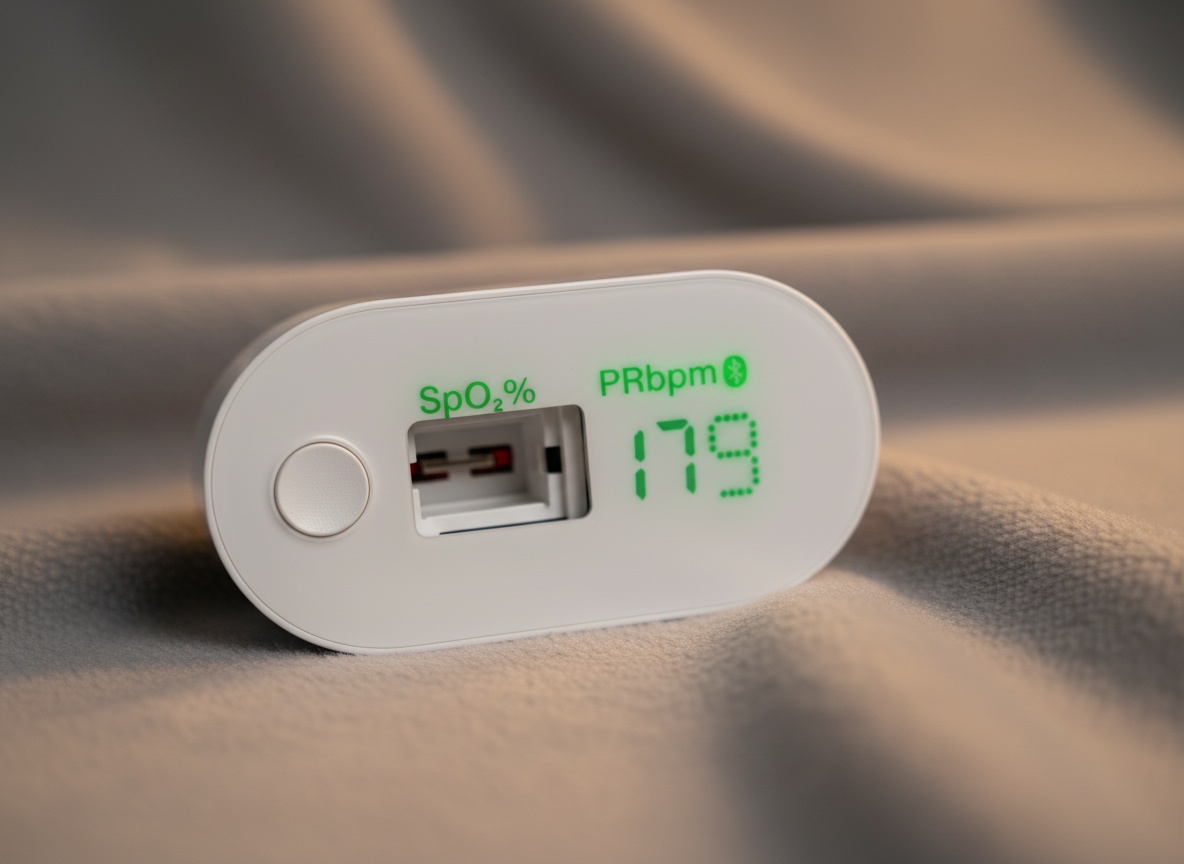
My phone went crazy the second I pressed the button. Finger on the sensor, one press, and there it was: 94% oxygen, pulse at 82, and a live cardiogram scrolling across the screen. That’s the iHealth AIR, a rechargeable bluetooth pulse oximeter that iHealth sent me to test, and you can check the current price on Amazon here. One button, one motion, and the reading is already on your phone, that’s the entire interaction.
The title of the video asks whether your oxygen monitor is lying to you. What I cared about was simpler: does this thing read fast, sync clean, and give me data I can actually keep? On all three, it delivered live in front of the camera.
What The iHealth AIR Is
It’s a fingertip pulse oximeter that clips on your index finger, exactly like the one they clamp on you in a hospital bed. It reads your blood oxygen saturation and your pulse, then shows it on an LED screen and syncs it to the free MyVitals app over Bluetooth. No coin batteries. It charges over USB and runs up to 300 uses on one charge.
Pairing Took One Button And A Few Seconds
Pairing was the fastest part of the whole test. I hit the plus button in the MyVitals app, it asked what I was adding, I picked the pulse oximeter (the one called the AIR), pressed the single button on the device, and watched the app search. Boom, device found. One tap on it, connecting, and it was completely done. Nothing else for me to do.
I already had a couple of other iHealth devices sitting there, the Glucco Plus and the Track Pro, so I know the app juggles more than one gadget. Adding the AIR to it didn’t fight me at all. If you’ve ever spent ten minutes wrestling a Bluetooth device into a phone, this was the opposite of that.
94%, Pulse 82, Live On The Screen
The live reading is where it got fun. I slid my index finger into the sensor, pressed the button, and the little tracker in the middle lit up. On my phone, the numbers filled in instantly: oxygen at 94%, pulse at 82, and my cardiogram drawing itself in real time. That is so cool. Watching your own pulse waveform draw itself in real time on a phone you already own is still a little surreal.
No pressure, no pain, no squeezing. You just rest the finger in there and press. And here’s the part I liked most for anyone tracking their health: it holds the data. If you use it sporadically without your phone, once a week or once a day, all of that still sits in the device. As soon as you connect and sync, it dumps that history into the app. So you can walk into your doctor’s office with weeks of trends instead of one random number.
The app also shows a plethysmograph waveform and a perfusion index, which is a fancy way of saying it tells you whether your reading is stable and the signal is strong. For a fingertip pulse oximeter at this price, having that confidence indicator is a nice touch.
The App Is The Whole Point, And That Cuts Both Ways
Everything good about this device runs through the phone. That’s the catch nobody puts on the box. The trend tracking, the historical sync, the cardiogram, the perfusion index, all of it lives in MyVitals. If you don’t want to install an app or make an account, you’re leaving most of what you paid for on the table.
The device does show a reading on its own LED screen, so it’s not useless untethered. But buying a bluetooth oximeter and never turning on the Bluetooth is like buying a car for the cup holders. The moment you start tracking on your phone is the moment the trend data and offline sync become useful. Worth knowing before you commit.
Get it now
iHealth AIR Bluetooth Pulse Oximeter
Get the best price on Amazon →This post contains affiliate links. I may earn a commission at no extra cost to you.

Who This Is Actually For
This is for people who want their oxygen and pulse numbers logged, not just glanced at. Fitness folks checking saturation around workouts. Anyone managing a condition where the trend matters more than a single reading. And anyone who wants to hand a health professional real historical data instead of “it felt low last week.”
The rechargeable battery is a quiet win for regular users. You don’t hunt for coin cells every time it dies. Charge it, use it up to 300 times, charge it again. In my test it took about half an hour on USB to get going. For a household that’s tracking daily, that’s the difference between a device you keep using and one that ends up dead in a drawer.
iHealth AIR vs A Basic Standalone Oximeter
A basic drugstore oximeter wins on one thing: simplicity. Clip it on, read the screen, done, no app, no account, no phone. If a single spot-check number is all you ever want, those cheaper units get you there.
Where the iHealth AIR pulls ahead is memory and charging. Those basic units run on disposable batteries and forget every reading the second you unclip. The AIR recharges over USB and keeps your history, syncing it to trends by hour, day, week, and year in the app. If you care about patterns, the AIR is a different tool. If a single number is all you want, save yourself the app setup and buy the $20 drugstore clip instead.
Advice Before You Buy
Charge it before your first use and download MyVitals before the device arrives so you’re ready to pair. Pairing took one button, but the app is the whole experience, so set that up first. Take your readings when you’re still, not mid-workout, since motion throws off the signal. Watch the perfusion index in the app to confirm the reading is stable before you trust the number.
And treat it for what it is: a personal monitoring tool for tracking trends over time, not a diagnostic replacement for your doctor. Bring the data to a professional, don’t self-diagnose from it. You can see current pricing and availability on Amazon here.
Pros
- Pairing was one button and a few seconds, no fighting the Bluetooth
- Live reading hit the phone instantly: 94% oxygen, 82 pulse, cardiogram in real time
- Rechargeable over USB, up to 300 uses per charge, no coin batteries
- Holds readings taken offline and syncs the full history once connected
- No pressure, no pain, light and easy to use on the finger
Cons
- Most of the value lives in the MyVitals app, so it’s underwhelming if you won’t use your phone
- Requires an account and app setup to unlock trend tracking
- Readings need you to stay still, not for mid-motion workout use
Frequently Asked Questions
What phones does the iHealth AIR work with?
It pairs with your smartphone over Bluetooth through the free iHealth MyVitals app, which is available for both iOS and Android. You add the device by hitting the plus button in the app and pressing the single button on the oximeter. In my test it found and connected in seconds.
Do I need the app to use it at all?
No, the device shows your reading on its own LED screen without a phone. But the trend tracking, cardiogram, perfusion index, and historical sync all live in MyVitals, so skipping the app means skipping most of what makes it worth buying.
Is there a monthly fee or subscription?
No subscription is required. The MyVitals app is free and handles the tracking, multiple users, and trend history without a monthly charge. You pay once for the device.
How long does the battery last and how do I charge it?
iHealth rates it for up to 300 uses on a single charge, and it recharges over the included USB cable. In my hands it took roughly half an hour on USB, so you’re not tethered to disposable coin batteries like older oximeters.
Can more than one person use it?
Yes, the MyVitals app supports multiple users, so a whole household can log separate readings and track their own trends. Each person’s SpO2 and pulse history stays tied to their profile.
Will it sync readings I took before pairing?
Yes. If you use it sporadically without your phone, the readings stay stored in the device. Once you connect and sync, all that history dumps into the app, so nothing you measured offline gets lost.
Can I use it during a workout?
Take readings before or after exercise, not while you’re moving. Motion interferes with the signal, so you want to be still for an accurate SpO2 and pulse. The in-app perfusion index helps confirm the reading is stable.
Is this a medical-grade diagnostic device?
iHealth notes the AIR is trusted by many U.S. telemedicine programs, but treat it as a personal monitoring tool for tracking trends, not a replacement for professional diagnosis. The real strength is bringing weeks of logged data to a health professional rather than self-diagnosing from it.
Clicking takes you to the seller's website. We may earn a small commission if you purchase, at no extra cost to you.
Get it now
iHealth AIR Bluetooth Pulse Oximeter
Get the best price on Amazon →This post contains affiliate links. I may earn a commission at no extra cost to you.
🛍️ Shop everything in this video
Every product mentioned, in one place — these are affiliate links, so I may earn a small commission at no extra cost to you.
🛍️ iHealth Pulse Oximeter — check price on Amazon →
🛍️ iHealth Glucco Plus — check price on Amazon →
🛍️ iHealth Track Pro — check price on Amazon →
About the reviewer
Seb and Michelle
We've tested over 6,500 products in the last 5 years - collaborating with over 4,000 brands and bringing our style of reviews to multiple platforms.