SV3C Solar Security Camera System Review: 4-Camera Kit
We tested the SV3C 4-camera solar security system. Here's what we found about setup, app quality, video clarity, and whether it's worth it.
This post contains affiliate links. I may earn a commission at no extra cost to you.
Quick Verdict
I am checking out this camera — well, these camera setups — because this is an entire security network. Four solar-powered cameras, a hardwired home base, a genuinely impressive app, 2K dual-lens video, and zero monthly fees. I think it’s really rare to see something this simple to set up that still has such a strong app and is literally virtually wireless. These things are fantastic.
Buy if you:
- Want full outdoor coverage without running any wires to the house
- Need a stable, reliable connection — the hardwired home base delivers exactly that
- Want color night vision and 2K video without paying a monthly subscription
- Like a plug-and-play setup where the app walks you through every single step
Skip if you:
- Can’t place the home base physically near your router — it needs an Ethernet connection
- Have very heavily shaded install spots with no flexibility for the solar panel cable
- Want a single-camera solution — this is a full 4-camera system and priced accordingly
Clicking takes you to the seller's website. We may earn a small commission if you purchase, at no extra cost to you.
Solar Security Camera System No Subscription Needed
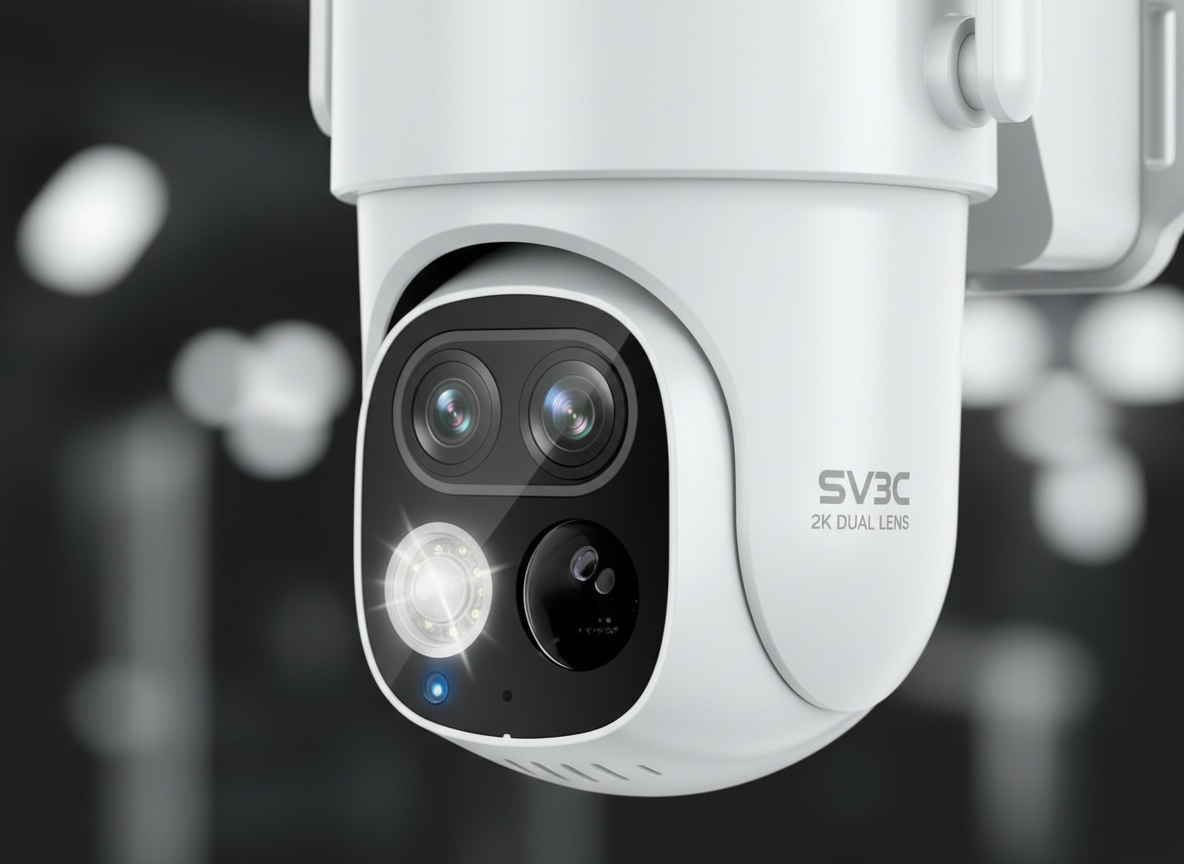
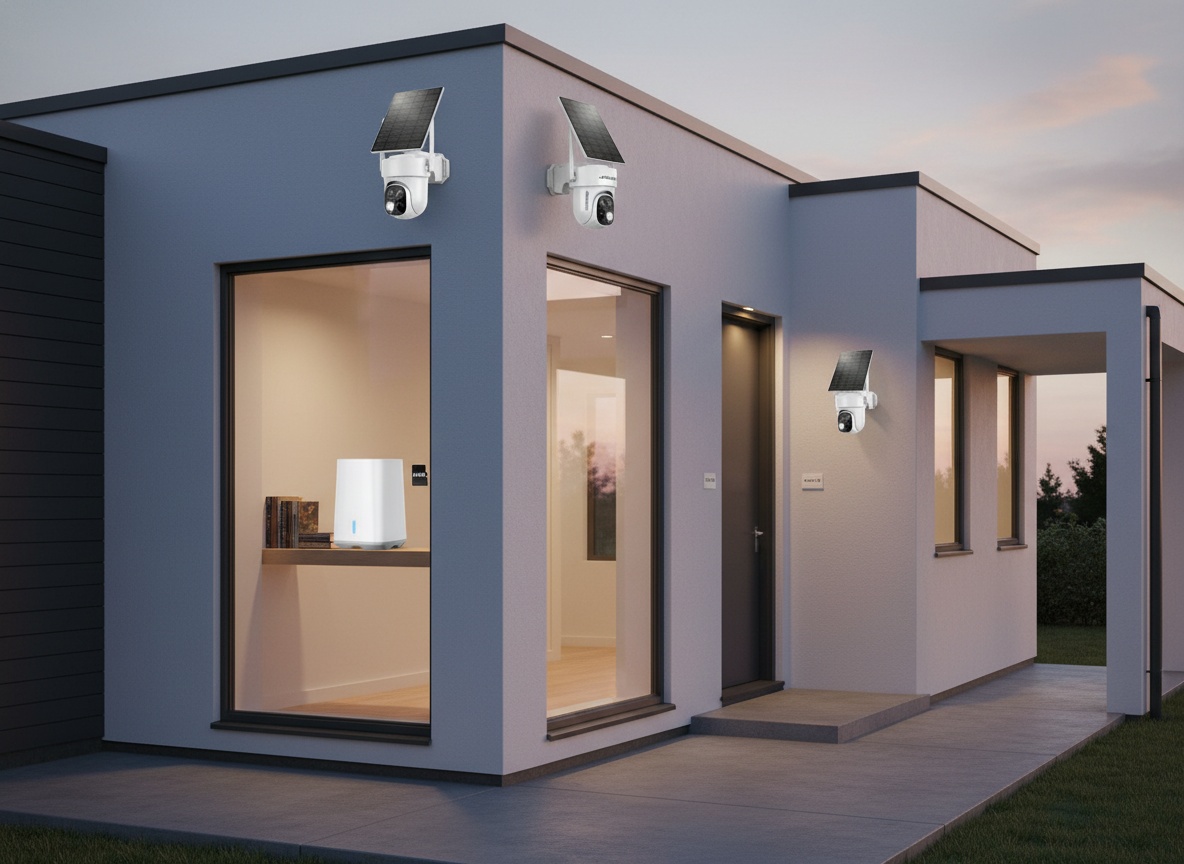
I am checking out this camera. Well, these camera setups — because this is an entire security network. That’s exactly how I opened the box on this one, and it set the tone for the whole experience. The SV3C Solar Security Camera System isn’t just a camera. It’s four cameras, four solar panels, a home base station, all the mounting hardware, and an app that ties the whole thing together without asking you to pay a cent per month.
It comes beautifully packaged. Pull the lid off and you’ve got four cameras, each with its own solar panel already connected to the camera via USB-C. I love the fact that yes, these are solar panels — and the cable length on each panel is genuinely generous. So if you need to mount a camera in a slightly shaded spot, you’ve got enough cable to snake the panel to wherever the sun actually hits. That’s a small thing, but it matters.
All the hardware is included. Brackets for the cameras. Brackets for the solar panels. All the cabling. Everything you need to get four cameras up and running without a separate trip to the hardware store. I think that’s fantastic, and it’s not something every system gets right.
And then there’s the home base. That’s the brain of the whole operation — and it’s also where the setup has one specific requirement worth knowing upfront.
The Home Base, the Ethernet Cable, and Why That’s Actually a Good Thing
So here’s the deal with the home base. Unlike a lot of systems I’ve used before where everything runs through Wi-Fi, this home base connects to your router via Ethernet. You need to physically place it next to your router and hardwire it in. I had to move mine to the other side of the house to do that.
And I’ll be real — my first reaction was “that’s a little inconvenient.” But once I thought about it for two seconds, the pro here is obvious. That hardwired connection ensures a perfect, stable connection between your home base and the internet. After that, every single camera talks wirelessly to the home base. So you get the reliability of a wired backbone with the convenience of completely wireless cameras. That’s a smart design trade-off.
Setup took about one minute once it was plugged in. Literally. Plugged the Ethernet from the home base into my hub, powered it up, and that little blue light came on. Blue light means it’s good to go. From there, you download the app, scan the QR code on the home base, and the system identifies itself automatically. Press next, next, next. They tell you everything you need to know. It is plug-and-play in the truest sense of the phrase.
We’re talking about a system that goes from “box on the floor” to “four cameras online and live in the app” without needing to call anyone or watch a tutorial. I pretty much knew from looking at the packaging that it was going to be that way, and it delivered.
The Bracket System Is Smarter Than It Looks
Here’s something I didn’t expect to be impressed by: the mounting bracket. I love that their bracket makes the whole thing work so seamlessly. Usually, mounting a security camera is awkward. It’s a big device, you’re up on a ladder, you’re trying to hold it steady while you drill. It’s a mess.
This system flips that. The bracket is what you install first. Three screws, done. Then, when you’re ready, you literally just bring the camera to the wall and go boop — it snaps right in. Can you imagine? Three screws, walk away, come back with the camera, snap. That’s it. It’s on the wall. That’s really cool, and it’s the kind of thing that makes a real difference when you’re doing four cameras across different spots on your property.
Each camera is hermetically sealed as well. So rain, humidity, outdoor conditions — it’s built for it. We live in the Caribbean where the climate is rough on electronics, so sealed outdoor hardware is something we pay attention to. No concerns there.
The antennas are also worth pointing out. Once you’ve got a camera up, the app will show you the signal strength in real time. If a wall is blocking signal from one direction, you can physically adjust the antennas to optimize for your setup. Small detail, but the app is so good at surfacing that kind of information that it almost feels like it’s coaching you through getting the best possible performance out of every camera position.
Solar Power, Battery Backup, and the Part Nobody Explains
Here’s the part that trips people up when they first look at solar cameras: what happens at night? The sun goes down, the panel stops generating power — so does the camera just turn off?
Nope. Each camera has an internal battery. The solar panel charges that battery throughout the day. The battery then powers the camera through the night. I unplugged the solar panel during my test to show this — the blue light on the camera stayed on. The battery was doing its job. That’s cool, and it’s the key to why this system can be truly wireless without any compromise in uptime.
And the cameras do have color night vision. Even without any light source, you get that colorful night mode image rather than the flat black-and-white you get from older infrared systems. Really nice thing to have here.
One more thing the app handles automatically: calibration. Once a camera is mounted, the app prompts you to calibrate. Press the button, the camera does a full 360, reads its environment — shaded areas, sunlight exposure, enclosed walls — and adjusts itself based on its specific location. Every camera gets its own calibration. I think this is awesome because every camera is going to be set up in a different way. No one-size-fits-all here.
Learn more
SV3C Solar Security Camera System
Get the best price on Amazon →This post contains affiliate links. I may earn a commission at no extra cost to you.

The App Is Where This System Actually Shines
I don’t throw that word around lightly, but the app is so good at this. Like genuinely good. Not “good for a security app” — just good.
When I plugged in the fourth camera during my test, the app automatically recognized it and pulled it into the system. I didn’t go through any setup process per camera. One time, good to go. You don’t have to repeat that whole pairing process for each unit — and with four cameras, that saves a real chunk of time.
Then I pulled up the live feed. And right there in real time, the app detected a person and asked: do you want to circle that person? So it recognizes people, tracks movement, and can be configured to focus on specific zones. Let’s say your field of view covers your whole driveway but you only care about your front door. You literally draw a box around the door, set it as your detection zone, and tell the system to ignore everything else. Every time that door moves, you get a notification. Everything outside that zone? Ignored. That’s a pretty powerful level of control for a system without a subscription.
And it’s not just notifications. The whole thing goes to the cloud. Replays, live feeds, two-way audio — all of it is accessible from anywhere. The two-way intercom feature is something I think people underestimate until they need it. Maybe your kids get home from school before you’re back from work. You can literally have a real conversation through the camera. Not just hear what’s happening — talk back. That’s great.
I pulled up a live feed comparison in the app: high quality at the top, low quality at the bottom. That’s wild. It’s really, really cool. Even in the lower quality mode, the amount of detail you can make out is more than I expected. The dual lenses on these cameras are doing serious work. The quality of the video — I was really impressed.
Who This Setup Is Built For
This is a system for homeowners who want real coverage. Not a single camera over the front door — four cameras across the property, tracking movement, storing footage in the cloud, running 24/7 without a wire in sight and without a monthly bill waiting for you at the end of the month.
I love love love that I don’t have to run any wires to the house. You could literally install one camera on a corner of your roof, run the solar panel to wherever the light hits, and you’re done. No electrician. No conduit. No drilling through walls. That’s the biggest pro for me. And for a four-camera system covering four different angles — that’s a huge deal.
It’s also a strong fit for anyone with kids at home, anyone who travels, or anyone who just wants to be able to check in on their property from anywhere in the world. The cloud playback and live monitoring through the app make that completely seamless.
One thing to keep in mind: if your router is in a spot where placing the home base nearby isn’t practical, that’ll be your first challenge. The Ethernet requirement is real. It’s not difficult — it took one minute when I did it — but you do need physical proximity to your router for that initial setup and ongoing operation.
Solar Security vs. Standard Wi-Fi Camera Systems
Most people comparing this are looking at two categories: a standard plug-in Wi-Fi camera system, or a battery-only wireless system without solar.
Plug-in systems are consistent on power but require running cables — which, depending on your property, can mean hiring someone or drilling a lot of holes. For outdoor coverage across multiple locations, that’s a significant project. This SV3C setup eliminates that entirely.
Battery-only wireless systems are simpler to understand, but you’re swapping batteries on a schedule or taking cameras down to recharge them. That gets old fast, especially with four units. The solar-plus-battery combo here solves both sides of that problem: you get wireless freedom and you don’t have to think about the power source again after install.
The hardwired home base is actually the thing that sets this apart from purely Wi-Fi-dependent systems. I’ve used home bases in the past where everything was Wi-Fi. This one is hardwired to the router, and the difference in connection stability is real. The cameras talk to the home base wirelessly, but the home base has a rock-solid wired connection to your network. That’s the architecture that makes this feel like a proper security system rather than a consumer gadget.
Where this system can’t compete: if you want a single small camera for a very specific spot and don’t need multi-camera coverage, a full 4-camera kit is probably more than you need. Check the current price at the link and decide if the scope matches your situation.
Setup Tips Before You Mount Anything
Do the home base first. Get it plugged in, Ethernet connected, blue light confirmed, and the app fully set up before you touch a single camera mount. Once the home base is live and you’ve scanned the QR code, every camera you add from that point on is automatically recognized. That sequence matters.
Install the brackets before you install the cameras. I know that sounds obvious, but the whole snap-in system only works the way it’s supposed to if the bracket is already in place on the wall. Three screws, walk away, come back with the camera, boop. That’s the move.
After mounting, let the app run its calibration before you decide on final camera angles. The calibration does a 360, reads the environment, and positions the camera for optimal coverage and charging. If you skip it and just point the camera manually, you’re leaving performance on the table.
And play with the antenna orientation once the cameras are live. The app shows you signal strength in real time. If you’ve got concrete walls between the camera and the home base — which we absolutely do — adjusting those antennas can make a real difference in how reliably the camera communicates.
Check today’s price and availability on the SV3C Solar Security Camera System on Amazon before making your decision.
Frequently Asked Questions
Does the home base really need to be hardwired, or can it connect via Wi-Fi?
It needs a physical Ethernet connection to your router — that’s not optional. The benefit is a more stable, reliable backbone for the whole system. The cameras themselves talk wirelessly to the home base, but the home base needs to be hardwired. It took about one minute to get that sorted once I physically moved the base near my router.
Will the cameras keep working at night without sunlight?
Yes. Each camera has an internal battery that the solar panel charges during the day. At night, the battery takes over. I unplugged the solar panel during testing and the camera stayed on — the battery was keeping it running. Color night vision is included, so you’re not getting flat black-and-white footage either.
Is there a monthly subscription fee for cloud storage or app features?
No subscription required. Cloud storage, live viewing, motion alerts, and playback are all included without a monthly fee. That’s one of the biggest reasons this system stands out in this category — the list of pros just keeps adding up.
How hard is it to mount the cameras?
Genuinely easy. You install the bracket first — three screws — and then the camera just snaps into the bracket. Boop, and it’s good to go. All the hardware is included in the box, so you’re not making a hardware store run. The whole mounting process was one of the standout parts of this setup for me.
Can you set specific detection zones in the app, or does it alert you to all motion?
You can absolutely customize detection zones. In the app, you draw a box around the area you care about — a specific door, a gate, a window — and tell it to ignore everything else. You only get notified when there’s activity in that exact zone. The app is so good at that kind of setup, it practically walks you through it.
Related reviews
Does it work if I have concrete walls between cameras and the home base?
It can, but you’ll want to pay attention to antenna positioning. The app shows you signal strength in real time, so you can physically adjust the antennas on each camera to find the best angle for your specific wall situation. We’ve got all concrete walls here and it was still able to maintain a connection — the antenna adjustment tip is key.
Learn more
SV3C Solar Security Camera System
Get the best price on Amazon →This post contains affiliate links. I may earn a commission at no extra cost to you.