Elgato Stream Deck XL Review: Advanced Controller
The Elgato Stream Deck XL puts 32 one-touch macro keys under your fingers. Here's why it cut the busywork out of every stream I run.

Reviewed by
Seb and Michelle
We've tested over 6,500 products in the last 5 years – collaborating with over 4,000 brands and bringing our style of reviews to multiple platforms. More about me →
This post contains affiliate links. I may earn a commission at no extra cost to you.
Quick Verdict
32 keys, one tap each, and the busywork that used to eat my streams is gone. The Elgato Stream Deck XL is the single upgrade that made my live setup feel run by one person instead of three. It’s built for creators who juggle scenes, cameras, audio and chat at the same time.
Buy if you:
- Run live streams in OBS, Ecamm, Twitch or YouTube regularly
- Switch scenes, cameras and audio mid-broadcast and keep losing your place
- Want more than a dozen macros without folder-diving
- Work on Mac or PC and want one controller for both
Skip if you:
- Have to build every key by hand before it does anything, there’s real setup time upfront
- Only need three or four shortcuts (the smaller Stream Deck Mini or Neo is plenty)
- Don’t use any of the apps it integrates with
Clicking takes you to the seller's website. We may earn a small commission if you purchase, at no extra cost to you.
The Stream Deck That Runs My Whole Setup
One button and a scene switches, a camera cuts, and the audio level drops right where I want it. That’s the pitch, and after living with the Elgato Stream Deck XL as part of my streaming setup, that’s the reality too. If you want to check the current price, here it is on Amazon.
Before this, a live session meant alt-tabbing between windows, hunting for the right hotkey, and hoping I didn’t fumble a transition on camera. The Stream Deck XL takes those multi-step moves and turns them into one tap. That’s where the “saves me hours” line comes from. It’s not marketing fluff for me, it’s the reason I stopped dreading the technical side of going live.
32 LCD keys and what each one can hold
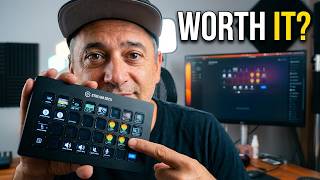
The XL’s 32 LCD keys are what separate it from every other Stream Deck: each one doubles as a tiny screen showing whatever icon you assign it. That matters mid-stream when you have maybe half a second to find the right button. You’re reading a picture of a camera or a mute icon, not trying to remember that scene four is third row, second from the left. Tap it, it fires, the icon confirms it landed. That’s the whole loop.
It’s a studio controller, not a keyboard. You assign each key to a task inside the Stream Deck software, then those keys instantly trigger whatever you told them to. Scenes, media clips, camera switches, lighting, audio, even a tweet. The integrations list is long: Elgato 4KCU, OBS, Twitch, YouTube, Twitter, Discord, Spotify, Philips Hue, vMix and VoiceMod, among others.
How it performs during a live session
The value shows up the second things get busy. Mid-stream, I’m not thinking about which window has focus or whether I hit the right key combo. I glance at the grid, tap the icon I need, and the visual feedback confirms it landed. That confirmation matters more than it sounds when you’re live and can’t afford a mystery.
Because there are 32 keys, I don’t have to bury half my actions in nested folders. Scenes on one row, camera switches on another, audio and lighting grouped where my hand naturally lands. The complex stuff collapses into single presses. That’s the whole point of a stream deck, and the XL has the real estate to do it without compromise.
The setup time that catches most people
Out of the box, it does nothing. That’s the catch. The Stream Deck XL is only as useful as the profile you build in the software, and building a good one takes an afternoon, not a minute. Every key has to be assigned, iconed, and grouped the way you actually work. Skip that and you’ve got 32 blank screens.
It’s worth the effort, but go in knowing it. The people who bounce off this device are the ones expecting plug-and-play magic. It’s plug-and-configure. Once your profile is dialed in, you rarely touch it again, but that first session is homework.
Get it now
Elgato Stream Deck XL
Get the best price on Amazon →This post contains affiliate links. I may earn a commission at no extra cost to you.
Who this is actually for
If you go live more than a couple of times a week and your session involves more than one camera, a scene transition, and muting yourself when the dog barks, the XL earns its price in the first broadcast. The tell is whether you’ve ever fumbled a transition on camera or alt-tabbed into the wrong window mid-stream. If that sounds familiar, this is your fix.
It’s also for the professional who lives in a handful of apps all day and wants one-touch control over repetitive tasks. Not just streamers, editors and multitaskers too. If your workflow is a stack of keyboard shortcuts you keep forgetting, this puts them on labeled buttons in front of you.
XL vs. the smaller Stream Decks
The XL isn’t the only Stream Deck, and it isn’t automatically the right one. Elgato makes a Stream Deck Mini for people who only need a few keys, a Stream Deck Neo as an entry point, and the Stream Deck Plus that adds dials on top of keys. If your action list is short, the Mini or Neo saves money and desk space and does the same job at smaller scale.
The XL makes sense once you’re running more than 15 or so distinct live actions, scenes, cameras, audio toggles, chat commands, because that’s when the smaller models force you into nested folders and the speed advantage disappears. If you can map your entire workflow onto 6 keys, the Mini saves you money and desk space and does the same job. Count your actual actions before you buy; that number tells you which model to get.
Advice before you buy
Plan your profile before you even plug it in. Sketch which actions you use most, group them by task, and build the layout around your hand position. The people who love this device are the ones who took setup seriously. The ones who shrug at it usually assigned six keys and gave up.
Lean on the integrations rather than raw hotkeys where you can. Linking directly into OBS, Twitch or Discord is more reliable than mapping keyboard shortcuts that can break if window focus shifts. And don’t over-decorate on day one. Start with the ten actions you use every stream, then add as you find gaps. You can always check the current price and availability here before you commit.
Pros
- 32 LCD keys give you room for a full workflow without folder-diving
- One-touch operation turns multi-step tasks into a single tap
- Per-key visual feedback confirms your command fired, which matters live
- Deep integrations with OBS, Twitch, YouTube, Discord, Spotify, Philips Hue and more
- Works on both Mac and PC
Cons
- Does nothing out of the box, the initial profile build takes real time
- Overkill if you only need a handful of shortcuts
- Only worth it if you use the apps it integrates with
Frequently Asked Questions
Does the Stream Deck XL work with Mac and PC?
Yes, it works with both Mac and PC. You install the Stream Deck software on either platform and your profile follows the device.
Do I need a subscription to use it?
No subscription is required for the core functionality. The Stream Deck software is what configures the keys, and the integrations with apps like OBS and Discord run through that. Some third-party plugins or icon packs may cost extra, but the device itself doesn’t lock features behind a monthly fee.
How is the XL different from the Stream Deck Mini, Neo or Plus?
The XL has 32 keys, the most in the standard lineup. The Mini and Neo have far fewer keys for lighter needs, and the Stream Deck Plus adds physical dials alongside its keys. Pick the XL if you have a lot of actions to map; pick a smaller one if you don’t.
Can I use it for things other than streaming?
Yes. It’s marketed as a studio controller but it works as a general macro pad for any repetitive workflow. Editors, developers and multitaskers use it to launch apps, run scripts and trigger shortcuts, not just to switch scenes on stream.
Does it connect over USB or wirelessly?
It connects over USB to your computer. That keeps the response instant and means there’s no battery to charge or wireless signal to drop mid-broadcast.
How many actions can each key hold?
Each key triggers whatever action you assign it, and you can use folders to nest more pages of keys behind a single button. So while there are 32 physical keys, the number of actions you can reach is effectively unlimited through folders and profiles.
Is it hard to set up if I’m not technical?
The physical setup is plug-and-go, but building a useful key layout takes some patience. Dragging actions onto keys is straightforward; the time goes into deciding what each key should do and grouping them sensibly. Plan for an afternoon on your first profile.
Will it slow down my computer during a stream?
It runs as a lightweight background app and shouldn’t be a meaningful drain on a machine already capable of streaming. If your system already handles OBS or Ecamm fine, the Stream Deck software sits alongside it without issue.
Get it now
Elgato Stream Deck XL
Get the best price on Amazon →This post contains affiliate links. I may earn a commission at no extra cost to you.
About the reviewer
Seb and Michelle
We've tested over 6,500 products in the last 5 years - collaborating with over 4,000 brands and bringing our style of reviews to multiple platforms.